
How to Check EA Exam Dates on PSI From India (in IST)
You can see every open remote EA exam date for India, with start times in India Standard Time, on PSI’s free availability checker at test-takers
6
From the list of parts to a day’s start times.
60days
Remote dates from 28 Sep to 24 Dec 2026, as checked 25 Sep 2026.
24hrs
Appointments must be booked at least 24 hours ahead.
$317
Paid when you book. Checking dates costs nothing.
PSI Services runs the EA exam, the Special Enrollment Examination (SEE), for the IRS. PSI’s portal has a public page that lists open dates for each part. Looking is free and needs no sign-in, and once you choose India Standard Time every start time is shown in IST. It is the quickest way to find out whether a date suits you before you create an account or pay anything.
Below, we walk through it screen by screen with annotated screenshots of PSI’s own pages. The steps are numbered in navy; the orange markers in the text, such as (marker 1), match the orange markers on each screenshot. Select any screenshot to enlarge it.
Check EA exam dates in IST, step by step
Six steps take you from the list of parts to the start times for a day. We used Part 1; Parts 2 and 3 work the same way.
Step 1
Open PSI’s checker and pick your part
Go to PSI’s public availability page, test-takers
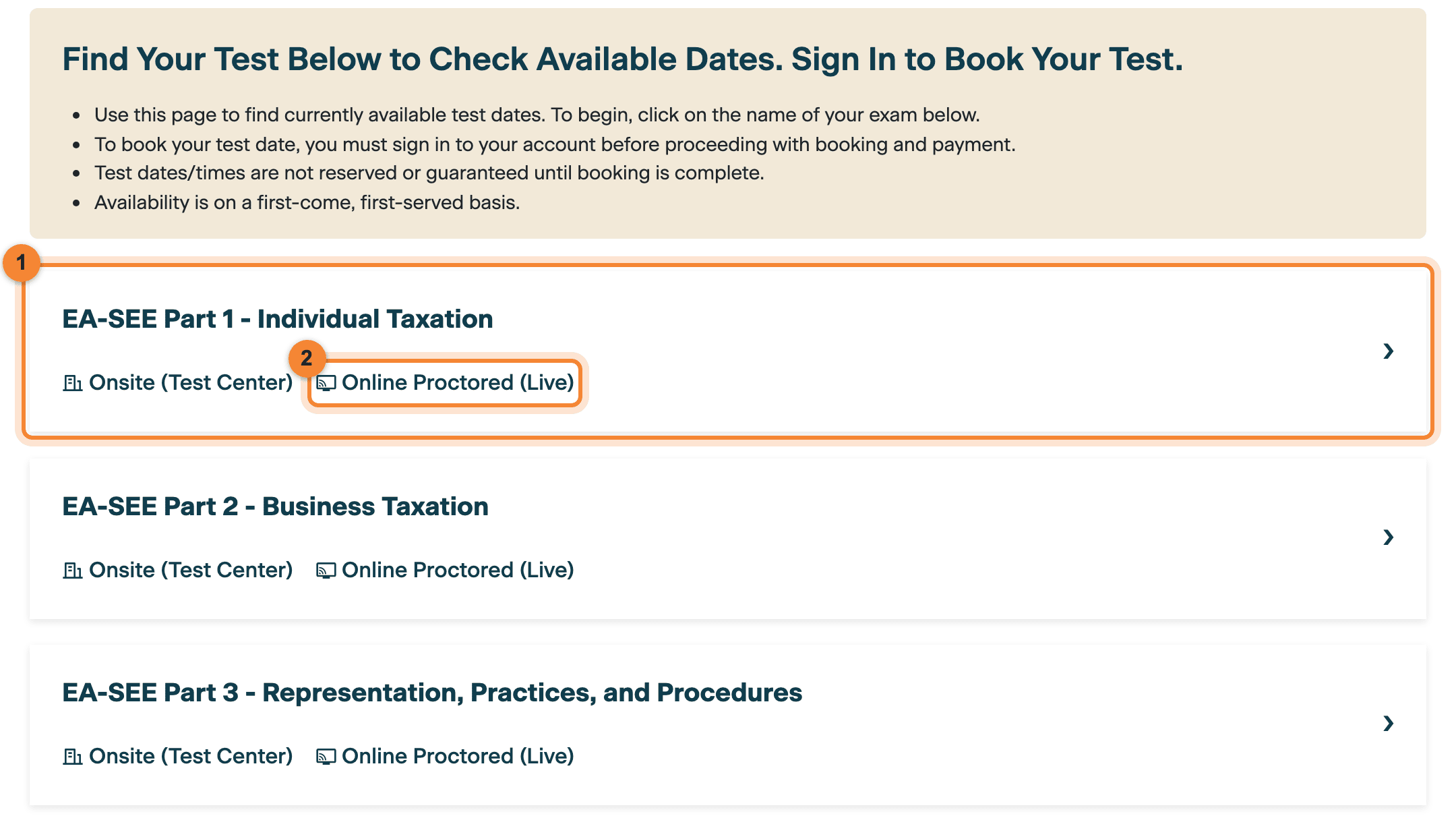
.psigov .us/ irs/ available/ test (opens in a new tab). You do not need an account or a sign-in. Click the name of the part you want to check (marker 1). Each part lists two formats, and Online Proctored (Live) (marker 2) is the remote option you can take from India. The box at the top of the page sets out PSI’s ground rules in four lines. Two of them matter most: “Test dates/times are not reserved or guaranteed until booking is complete.” and “Availability is on a first-come, first-served basis.” Looking is free, and it holds nothing.
Step 2
Note the fee, then choose CONTINUE
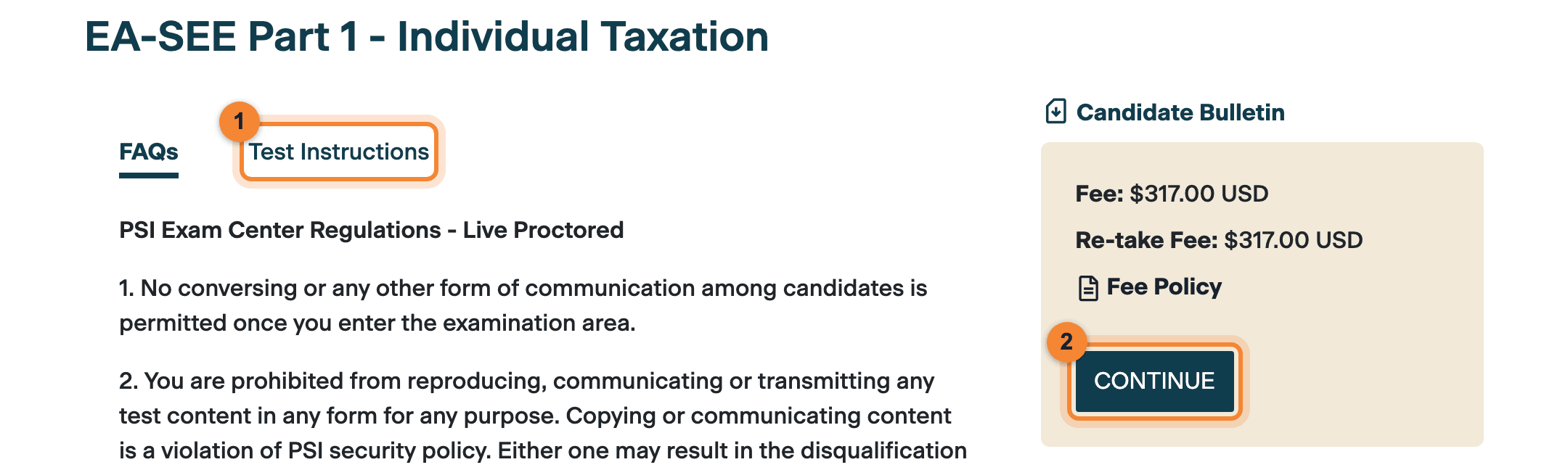
The part’s own page opens and shows the fee, $317.00 USD, and the re-take fee, also $317.00 USD. The Test Instructions tab (marker 1) links PSI’s tutorial videos, including the Online Proctored (Live) experience. Choose CONTINUE (marker 2).
PSI’s rules, including its rules for remotely proctored testing, are under the FAQs tab, which opens first. They are worth reading once before you book. You pay the fee only when you book, never while you check dates.
Step 3
Choose Online Proctored (Live)
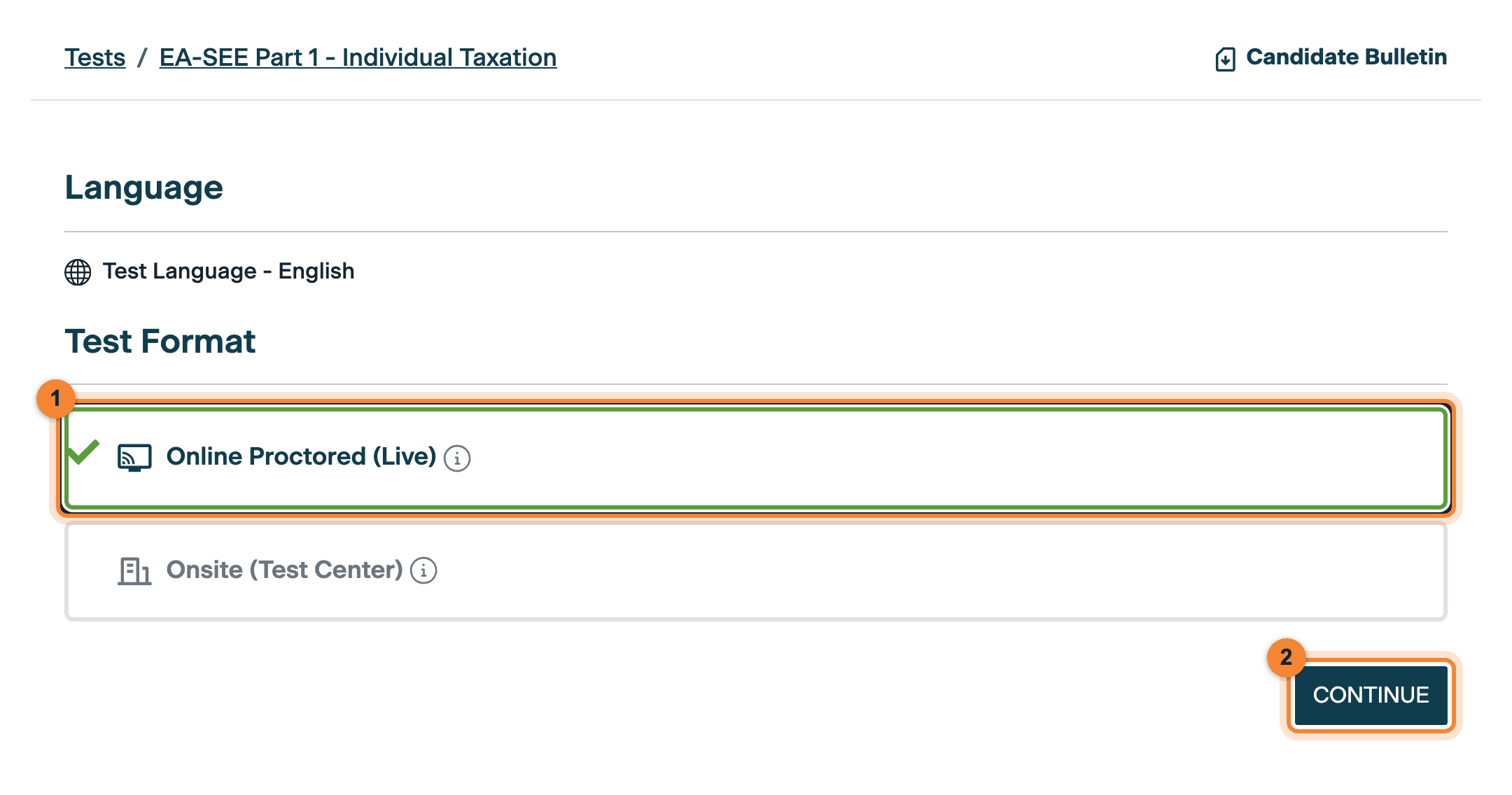
Under Test Format, select Online Proctored (Live) (marker 1). A green tick marks your choice. Then choose CONTINUE (marker 2).
The same screen shows the test language, English. Leave Onsite (Test Center) alone: PSI’s test centres are in the US only, and its candidate bulletin says “There is no in-person international testing.”
Step 4
Set Country to India and Timezone to India Standard Time
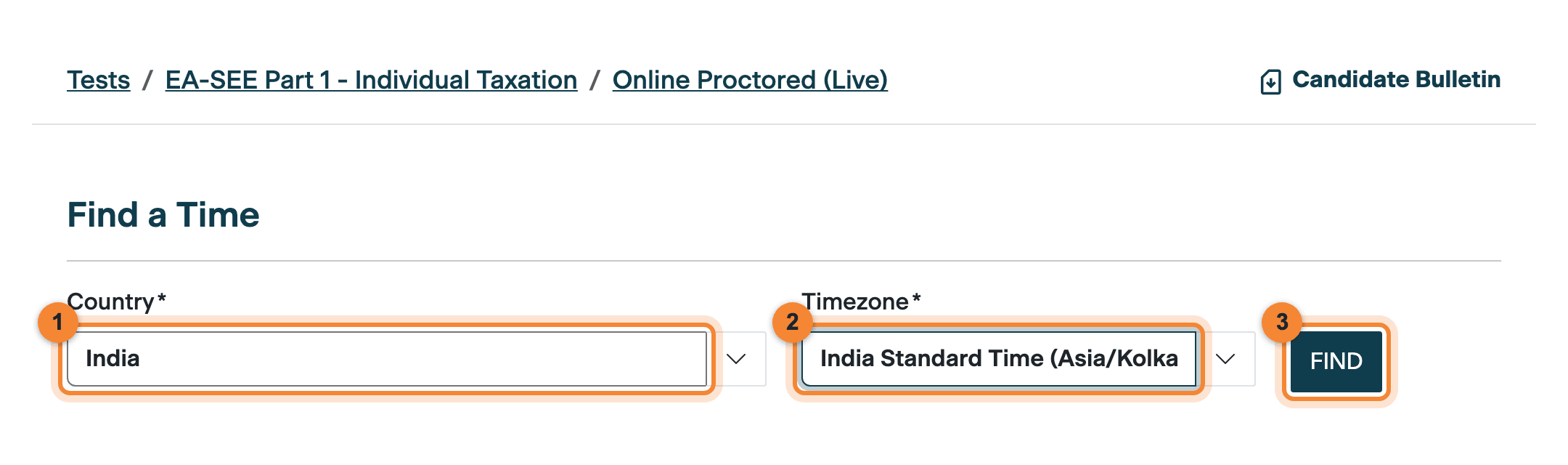
On the Find a Time screen, set Country to India (marker 1) and Timezone to India Standard Time (Asia/Kolkata) (marker 2). Then press FIND (marker 3).
This is the step that matters most. The checker shows start times in the time zone you pick, so with India Standard Time selected, every slot you see is already in IST. There is nothing to convert from US time. Make the same choice every time you check, for every part.
Step 5
Read the calendar: green circles are open days
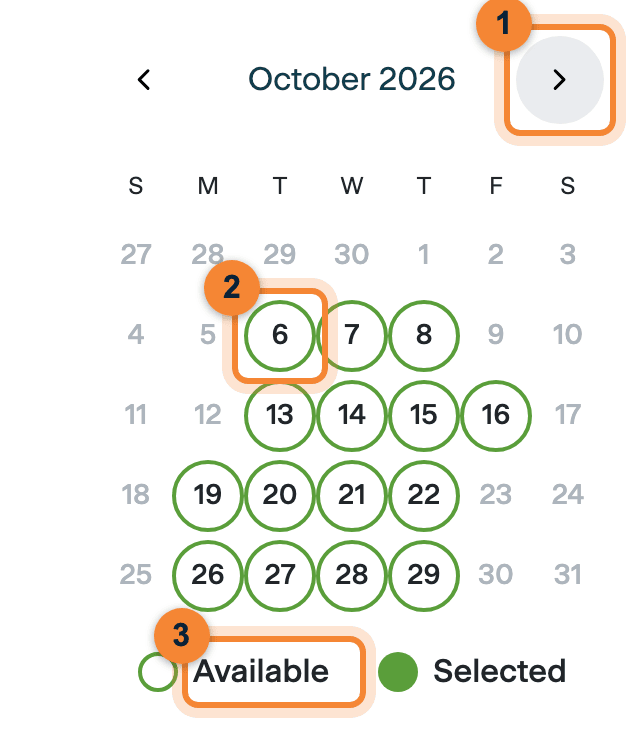
A month calendar appears. Use the arrow (marker 1) to move from month to month. Days circled in green, such as 6 October (marker 2), have open slots, and the key underneath calls them Available (marker 3).
In our capture, 6 October was the first open day in October. Days without a circle had no open slot for that part. Page through every month on offer: when we checked, the last date listed was Thursday 24 December 2026.
Step 6
Click a day to see its start times in IST
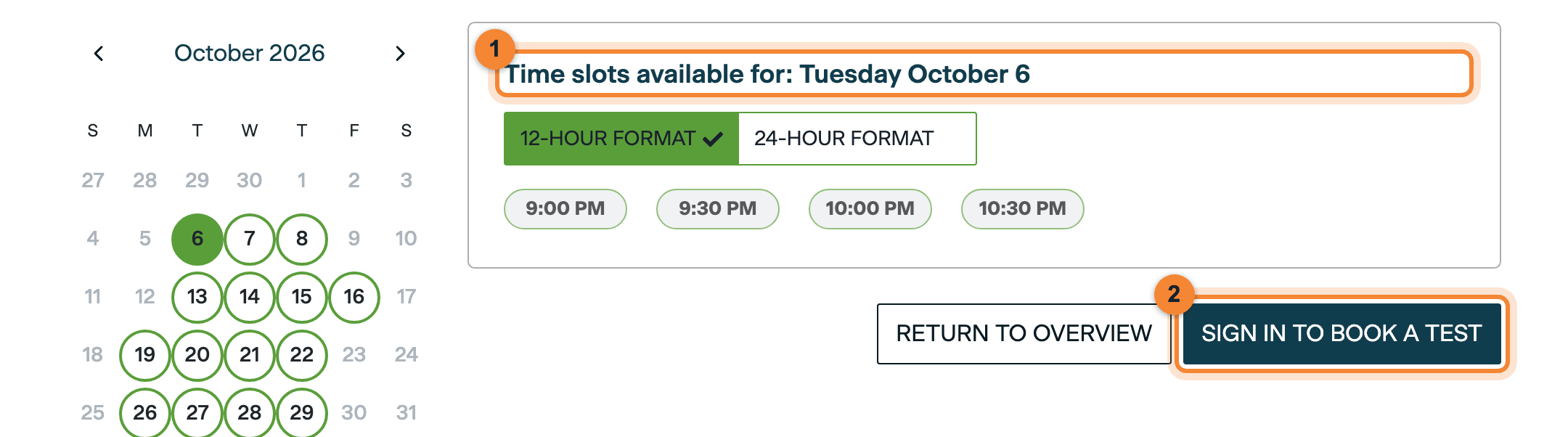
Click any green day. The panel shows “Time slots available for:” and the date (marker 1), with that day’s start times listed underneath. You can switch between 12-hour and 24-hour format.
When we checked on 25 Sep 2026, Part 1 showed four start times for Tuesday 6 October 2026: 9:00 PM, 9:30 PM, 10:00 PM and 10:30 PM IST. That is one day and one part, so treat it as an example, not a timetable.
SIGN IN TO BOOK A TEST (marker 2) is where checking ends and booking begins. To go further you need a PSI account (Part 2 shows how) and a PTIN: PSI’s bulletin says you must have a PTIN to schedule (our PTIN guide).
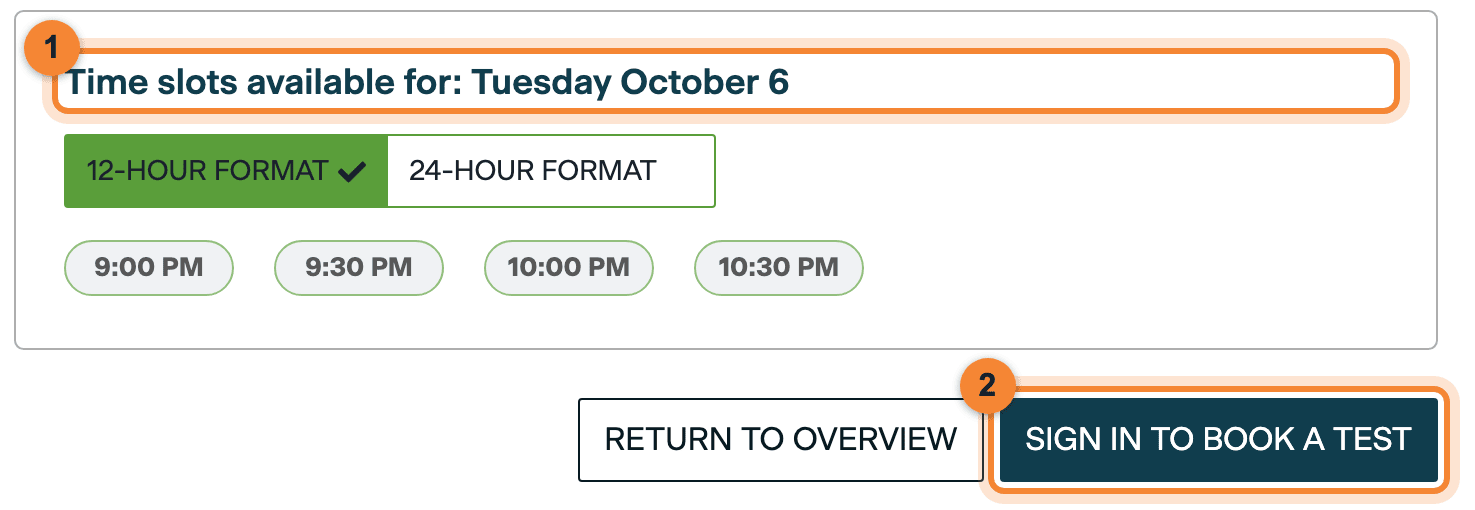
Click a day to see its start times in IST (1). To hold a slot you must sign in and pay (2); the checker itself reserves nothing. Screenshot: PSI Services, captured 25 Sep 2026. Note: Evening slots run late
PSI books four hours for every appointment: the exam itself is 3.5 hours, with a tutorial before it and a customer satisfaction survey after it. So a 9:00 PM IST start runs to about 1:00 AM IST. (That end time is our arithmetic from PSI’s four-hour appointment, not a time PSI shows.)
Good to know: You have your dates. Booking is the next step.
You have now seen the open days and start times in IST without an account. To hold a slot, you sign in, book and pay. Part 4 covers booking and exam day.
What the checker showed for India
We ran the checker for all three parts on the evening of 25 Sep 2026 (IST), with Online Proctored (Live), Country India and India Standard Time. The calendars below show every open day it listed; later months were not yet open.
As checked
Available remote exam days for India, September to December 2026
Online Proctored (Live), Country India, India Standard Time. Parts 1, 2 and 3 showed exactly the same days.
60
2 days
September 2026: 2 available days: 28, 29 September.
15 days
October 2026: 15 available days: 6, 7, 8, 13, 14, 15, 16, 19, 20, 21, 22, 26, 27, 28, 29 October.
22 days
November 2026: 22 available days: 2, 3, 4, 5, 6, 7, 9, 10, 11, 12, 13, 14, 16, 17, 18, 19, 20, 21, 23, 24, 25, 26 November.
21 days
December 2026: 21 available days: 1, 2, 3, 4, 5, 7, 8, 9, 10, 11, 12, 14, 15, 16, 17, 18, 19, 21, 22, 23, 24 December.
- Available day
- Before 25 Sep 2026
- Bar: the share of the month’s days that were open
- Last available date shown: 24 December 2026. Later months were not yet open.
- 9:00 PMIST
- 9:30 PMIST
- 10:00 PMIST
- 10:30 PMIST
Two patterns stood out. These are our reading of the calendars, not a PSI rule, and they may change:
- No Sunday dates were listed in any month.
- October dates were listed on weekdays only; November and December also included Saturdays.
We recorded start times for one day only: Tuesday 6 October 2026, Part 1, at 9:00 PM, 9:30 PM, 10:00 PM and 10:30 PM IST. Other days and other parts may differ, so click each day you are considering.
Information: Treat this as a snapshot
Availability changes daily and slots go first come, first served. Before you plan around any date above, open the live checker (opens in a new tab) and look again.
Six things to know before you book
Check every part you plan to sit
Each part has its own calendar. On 25 Sep 2026 all three showed the same days, but PSI does not say whether the parts share one pool of remote slots. Check each part separately, and check again just before you book.
A slot is yours only once you book
The checker reserves nothing, and PSI fills slots first come, first served. If a date matters to you, book it rather than waiting.
The calendar opens a few months ahead
When we checked, dates ran to Thursday 24 December 2026, and January and February 2027 were not yet open. PSI’s general FAQ says exam sessions are available at least 6 weeks in advance, and suggests booking 4 to 6 weeks before your preferred date.
Book at least 24 hours ahead
PSI’s bulletin says appointments must be scheduled at least 24 hours in advance, so you cannot book a slot that starts less than 24 hours from now.
Confirm the time zone when you book
The checker shows IST because you chose it. When you book, check the date, time and time zone on your confirmation, and tell PSI straight away if anything is wrong.
Pick a time you can sit through
The appointment lasts four hours. If you choose a late-evening IST slot, be sure you can keep your room private and stay alert until it ends.
Plan backwards from 28 February 2027
The current testing window closes on 28 February 2027, and nothing runs in March or April. Start from that date and work back.
1 Jul 2026
The current testing window opened
PSI’s bulletin: “The current test window is July 1, 2026, to February 28, 2027.”
25 Sep 2026
We checked: 60 open days, 28 Sep to 24 Dec 2026
Remote dates for India, and the same days for all three parts.
Jan and Feb 2027
Not yet open when we checked
The window runs to 28 February, but no January or February dates were listed yet. Look at the calendar again each month.
28 Feb 2027
The current window closes
You may take each part up to four times in a window. Every attempt, first or retake, costs $317.
Mar and Apr 2027
No testing
PSI’s bulletin: “Testing is not available in the months of March and April each year while the examination is updated.”
- Book at least 24 hours ahead. In general, change or cancel at least 48 hours before your appointment to keep your fee; cancel within 48 hours and the fee is lost.
- Leave room for a second attempt if you might need one. A retake needs a new booking, a new $317 fee and an open slot, so do not leave the first attempt at a part to the last weeks of the window.
- Do not plan around January or February yet. Those dates were not open when we checked. Wait until they appear on the calendar.
- A part you pass carries over for three years from the date you pass it, so you can spread the three parts out.
For what each part covers and how it is scored, see the EA exam pattern, paper by paper.
Why PSI’s notice still says “delayed”
Warning: PSI’s portal still shows an older notice
PSI’s IRS portal and its candidate bulletin (revised 28 August 2026) still say “Scheduling and testing for international candidates is temporarily delayed.” The portal adds: “New start dates have not yet been determined.”
The checker tells a different story. On 25 Sep 2026 it listed bookable Online Proctored (Live) dates for India in IST, and we have confirmed first-hand that candidates in India have been sitting the exam remotely since 2 September 2026. Rely on the live checker and on the booking itself, not on the notice. Part 1 of this series explains the background.
Next: your PTIN, account and booking
To turn a date into a booking you need two things the checker never asks for. The first is a PTIN: PSI’s bulletin says “Applicants must have a Preparer Tax Identification Number (PTIN) issued by the Internal Revenue Service (IRS) to schedule an examination.” The second is a PSI account, in your name exactly as it appears on your ID. Then you sign in, pick your slot and pay US$317 for the part.
Get your PTIN
PSI needs an IRS PTIN before you can schedule. Our guide covers the application for Indian candidates.
Read the PTIN guideStart here: remote testing from India
What changed for candidates in India, where to see live dates, and the path from PTIN to exam day.
Read the guideCreate your PSI account
Register on PSI’s IRS portal, step by step. The name you use must exactly match your ID.
Read the guideBook and prepare for exam day
The $317 fee per part, reschedule rules, the compatibility check, your room and ID on the day.
Read the guide
Quick answers
Do I need a PSI account to check EA exam dates?
No. PSI’s availability checker at test-takers
.psigov .us/ irs/ available/ test is public. You need to sign in only when you book and pay. How do I see EA exam times in India Standard Time?
Choose your part and Online Proctored (Live). On the Find a Time screen, set Country to India and Timezone to India Standard Time (Asia/Kolkata), then press FIND. The start times are then shown in IST.
Does checking a date hold it for me?
No. PSI says test dates and times are not reserved or guaranteed until booking is complete, and availability is on a first-come, first-served basis.
How far ahead can I see remote EA exam dates for India?
When we checked on 25 Sep 2026, dates ran to Thursday 24 December 2026, and January and February 2027 were not yet open. Availability changes daily, so use the live checker.
What times are the remote EA exam slots for India?
When we checked on 25 Sep 2026, Part 1 had start times of 9:00 PM, 9:30 PM, 10:00 PM and 10:30 PM IST on Tuesday 6 October 2026. We recorded times for that one day only. Availability changes daily; click any open day in the checker to see its own times.
How much does each part cost?
PSI’s bulletin sets the fee at $317 per part, paid when you book. The part’s page on PSI shows “Fee: $317.00 USD” and “Re-take Fee: $317.00 USD”. Checking dates costs nothing.
Official sources
Every PSI rule and figure in this guide comes from these PSI pages, read on 25 Sep 2026. The confirmation that candidates in India have been testing since 2 September 2026 is our own, first-hand. The screenshots are of PSI’s public pages; nothing behind a sign-in was used.
- PSI: check available exam dates (no sign-in needed)test-takers.psigov.us (opens in a new tab)
- PSI: EA-SEE Part 1 test details and instructionstest-takers.psigov.us (opens in a new tab)
- PSI: testing with PSItest-takers.psigov.us (opens in a new tab)
- PSI: IRS Special Enrollment Examination Candidate Information Bulletin (PDF)test-takers.psigov.us (opens in a new tab)
- PSI: IRS program FAQstest-takers.psigov.us (opens in a new tab)
- PSI: IRS program general informationtest-takers.psigov.us (opens in a new tab)
Checked on .
Sankhya Academy is an independent training provider, not affiliated with or endorsed by the IRS or PSI Services.