
How to Book Your Remote EA Exam and Prepare for Exam Day
On PSI’s IRS portal, pick your exam part, Online Proctored (Live) and an India Standard Time slot at least 24 hours ahead, then sign in and pay US$317 per part by MasterCard, Visa or American Express. In general, change or cancel at least 48 hours before the appointment to keep your fee. Before the day, run PSI’s compatibility check, clear a private room, and keep an original, unexpired ID such as your passport ready for the proctor.
$317
Paid when you book. A retake costs the same.
24hrs
Appointments must be scheduled at least 24 hours ahead.
48hrs
Do it at least 48 hours ahead and, in general, you keep your fee.
4hrs
3.5 hours of exam, plus a tutorial before and a survey after.
Book your remote exam in four steps
The booking starts on PSI’s public pages, which anyone can open, and finishes after you sign in. We show the public screens below. The signed-in booking and payment screens are described from PSI’s own bulletin and portal pages.
PSI’s portal still carries an older notice that international testing is “temporarily delayed”, but candidates in India have been sitting the remote exam since 2 September 2026, and on 25 Sep 2026 the public checker listed dates for India: go by the checker and the booking itself (Part 1 explains the notice).
Step 1
Have your PTIN and your PSI account ready
PSI’s bulletin says you need an IRS Preparer Tax Identification Number (PTIN) to schedule the exam, so get that first (our PTIN guide). Then create your PSI test-taker account (Part 2) in your name exactly as it appears on the ID you will show on exam day.
Step 2
Pick your part, Online Proctored (Live) and an IST start time
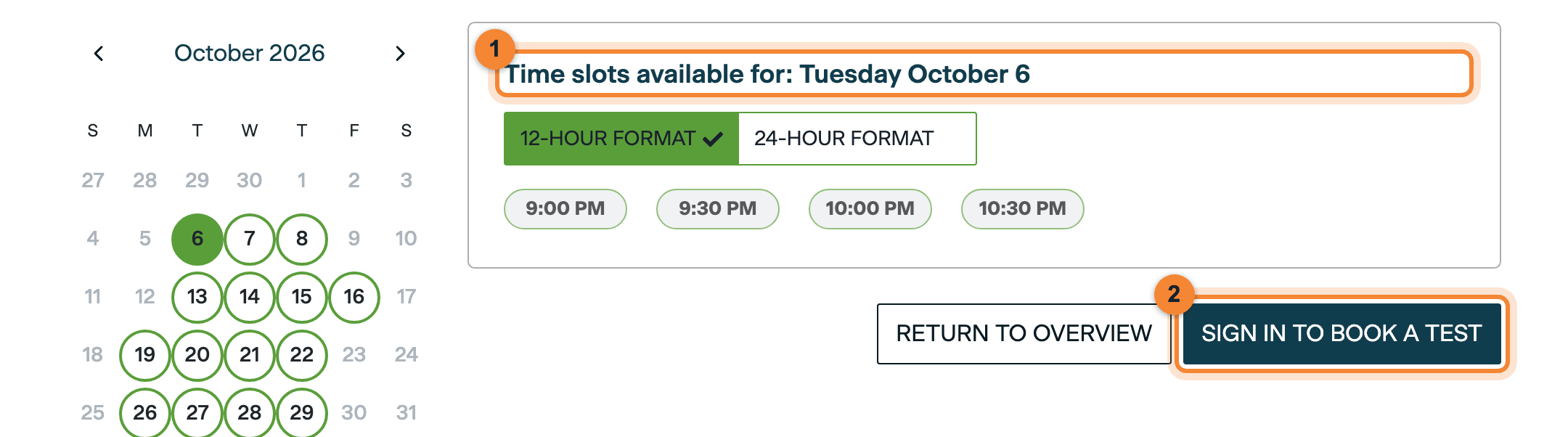
Start on PSI’s public date checker: pick the exam part, choose Online Proctored (Live), which is the remote option, and set Country to India and Timezone to India Standard Time so start times show in IST. Click a date to see its start times, note the date and time you want, then select SIGN IN TO BOOK A TEST. Appointments must be scheduled at least 24 hours in advance.
Part 3 walks through every checker screen with annotated screenshots. This is what it showed for India when we checked.
Step 3
Sign in, then book and pay US$317
You must sign in to your PSI account before booking and payment. The fee is US$317 per exam part, paid at the time of scheduling. PSI’s candidate bulletin lists MasterCard, Visa and American Express as accepted payment methods; cash, cheques and money orders are not accepted. No date or time is reserved until the booking is complete.
The screenshot below is PSI’s public date checker; SIGN IN TO BOOK A TEST is where booking begins. We did not create a PSI account for this series, so we have not seen PSI’s signed-in booking and payment screens: this step is described from PSI’s bulletin and portal pages. We will add screenshots of the signed-in screens.
You can also book by phone on PSI’s international line, +1 (913) 456-7498, Monday to Friday, 7:30 AM to 8:00 PM ET.
Step 4
Keep the confirmation number and check the email
Once the appointment is scheduled, PSI gives you a confirmation number. Keep it: you need it to change or cancel the appointment. PSI also emails a confirmation with the date, time and location of the exam. Check the exam part, date, time and time zone, and tell PSI straight away if anything is wrong. If the email does not arrive, sign in to PSI’s portal and request a duplicate.
Information: Your confirmation email also names your testing app
PSI’s general system-requirements page (for all PSI exams) says your exam confirmation email tells you which app to use: the PSI Secure Browser or the PSI Chrome Extension. You need to know which before the computer checks below.
Fees, changes and cancellations
Testing fee
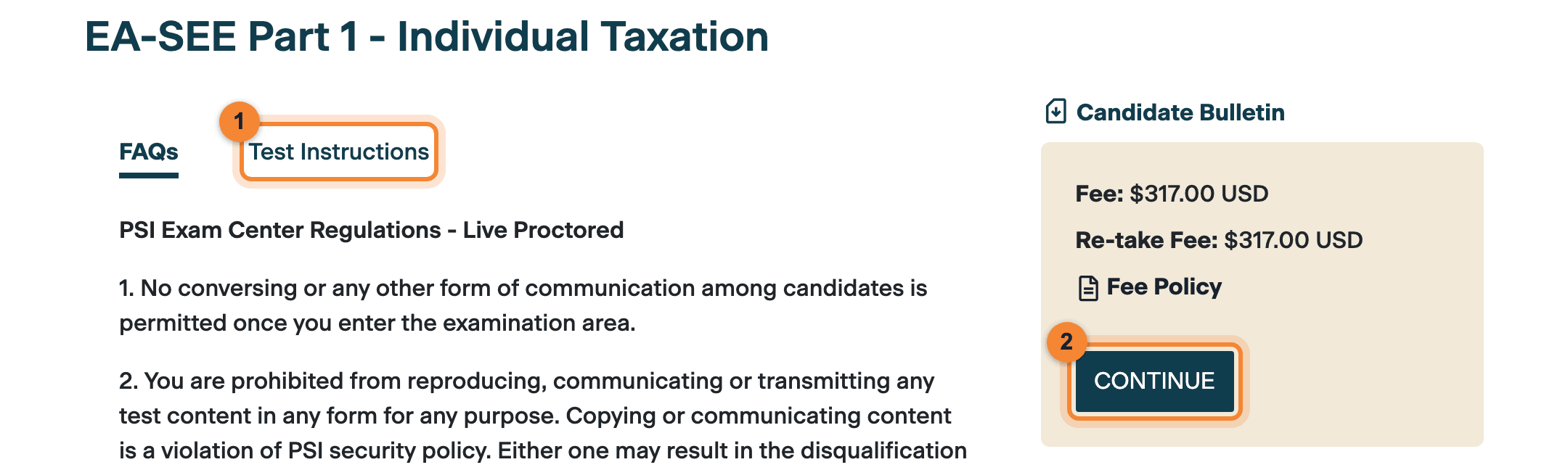
$317
per exam part, in US dollars ($317.00 USD)
You pay it each time you book a part, retakes included.
- Paid in full at the time of scheduling
- $317.00 USD, the same fee again
- MasterCard, Visa or American Express
- Cash, cheques or money orders
- Generally not refundable or transferable
PSI shows the fee in US dollars, so check with your bank that your card can make an international payment, and what it charges for one.
The 48-hour line
What happens to your fee as the appointment gets closer
Change or cancel, and in general keep your fee
You may cancel, or ask for a refund, without forfeiting the fee if you make the request at least 48 hours before your appointment.
A cancellation now forfeits the fee
Any cancellation within 48 hours of your appointment time forfeits the testing fee. A refund request made now is decided on all the facts and circumstances.
Booking itself closes 24 hours before a slot: appointments must be scheduled at least 24 hours in advance.
Miss it and you pay again
If you miss your appointment or arrive late by 30 minutes or more, you will not be permitted to test. The fee is forfeited, and you pay another fee to book again.
The bulletin states this rule generally; it gives no separate rule for launching a remote exam, so aim to connect up to 15 minutes before your start time.
Changing the date or time
To reschedule, contact PSI: online through the IRS portal, or by phone on PSI’s international line, +1 (913) 456-7498. Keep your confirmation number to hand, because you need it to change or cancel. In the same section the bulletin also says: “You must wait at least 24 hours before rescheduling for the same exam part.” It does not explain that line any further, so if it could affect your plans, ask PSI before you change anything.
Refunds, and when PSI cannot hold your slot
Testing fees are generally not refundable or transferable. PSI considers refunds only in very limited situations, such as the candidate’s death or a duplicate registration, and may ask for supporting documents. If PSI cannot provide your remote appointment, your exam is rescheduled without losing the fee. If the appointment was available and you chose not to appear, the fee is forfeited and you pay a full fee again.
Attempts and the testing window
You may take the three parts in any order, and each part up to four times in a testing window. The current window runs from 1 July 2026 to 28 February 2027, and there is no testing in March and April while the exam is updated.
Before exam day
Check your computer well before the day
You sit the remote exam on your own computer. PSI says most issues that delay exams can be avoided by reviewing its system requirements in advance, so do these three things on the computer and internet connection you will actually use.
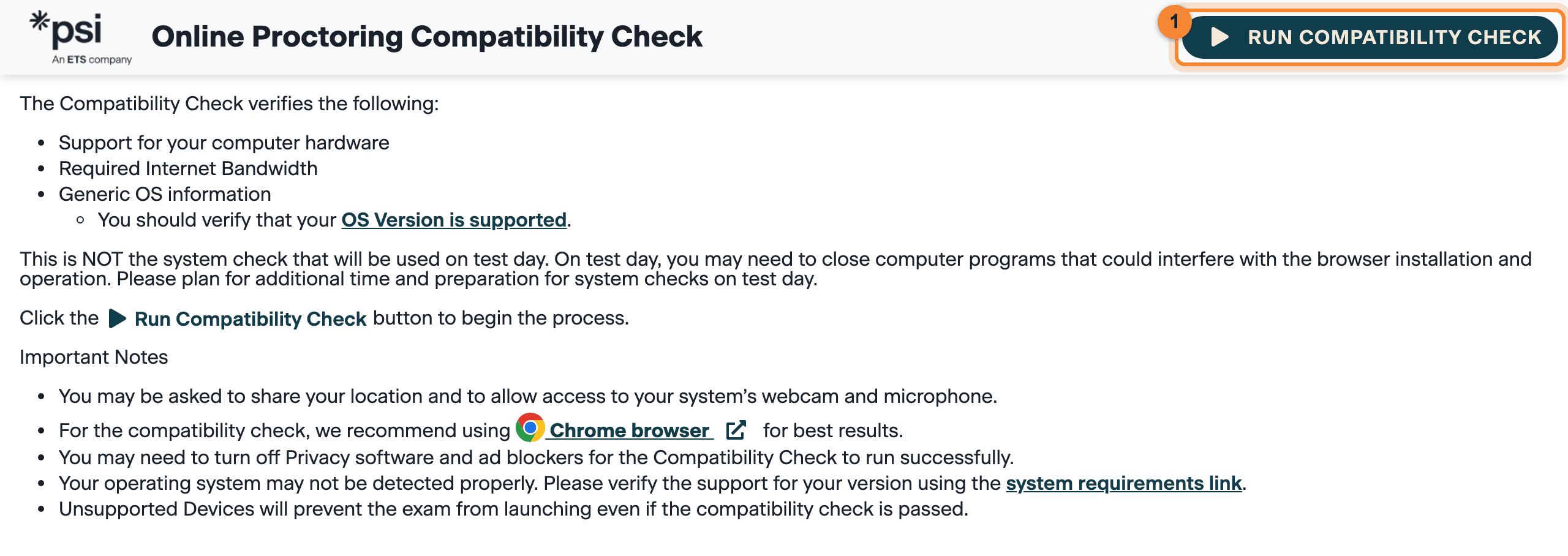
- Run PSI’s online proctoring compatibility check (syscheck
.bridge .psiexams .com (opens in a new tab)). PSI recommends Chrome for it. It checks support for your computer hardware, your internet bandwidth and basic operating-system information, and it may ask to share your location and to use your webcam and microphone. - Find out which testing app you need. PSI’s general system-requirements page (for all PSI exams) says your confirmation email names it: the PSI Secure Browser, which you install and which needs admin-level access, or the PSI Chrome Extension, which runs in the latest Google Chrome. If it is the Secure Browser, the same page says the only way to confirm your full setup is the Secure Browser tutorial, which it places under what it calls My Tests in PSI’s Test Taker Portal, after you book.
- Check the requirements below, and test your camera, microphone and connection at video-diagnostics
.twilio .com (opens in a new tab), a tool PSI’s general page points to. PSI’s IRS portal links to its Bridge platform system requirements (opens in a new tab), so check that page too.
Warning: Passing the check is not the finish line
PSI says this is not the system check used on test day, and that an unsupported device will stop the exam from launching even if the check passes. Confirm your operating system against the list below, and plan extra time for system checks on the day.
- A personal computer on which you have administrator permissions. PSI warns that firewalls and security settings on employer-issued computers may stop its software working.
- PSI Secure Browser (installed, needs admin-level access and 500 MB free) or PSI Chrome Extension (latest Google Chrome only). Your confirmation email says which. Chromebooks: Chrome Extension only.
- Supported: Windows 10 or 11 (64-bit); macOS Sonoma (14), Sequoia (15) or Tahoe (26); Ubuntu 22.04, 24.04 or 26.04 LTS. Not supported: Windows on Snapdragon, Windows 10 or 11 in S-Mode, Windows Education and all Enterprise editions; macOS Ventura (13) and Monterey (12); Ubuntu 20.04 and non-LTS releases.
- 8 GB minimum, 16 GB recommended.
- 1024 × 768 minimum, 1920 × 1080 or higher recommended.
- 3 Mbps or faster, upload and download, recommended; 750 kbps minimum. No VPN or corporate firewall.
- Must manage a full 360° scan of the room at check-in: turn the whole laptop, or use an external webcam you can move. It stays on throughout; unplugging it ends the session.
- Microphone on for the whole exam, and the computer’s built-in speakers. No headset or earbuds. Unplug any extra cameras and microphones.
- Mobile phones, virtual machines and most tablets (a Surface Pro with a front camera is the one exception).
Before exam day
Your room, your desk and your ID
PSI’s Remote Testing Regulations (bulletin pp. 24–25) apply for your whole appointment. PSI may audio- and video-record the session, and breaking the rules can end the exam or disqualify the result.
Test in a private room with nobody else in it, children and pets included. Clear your desk of everything you do not need, make sure the proctor can see your face clearly, and dress as you would in public. Before the exam is launched you will be asked to scan the room, and your camera must manage a full 360° scan. Keep your shoes on, and keep any clothing or jewellery you are allowed to wear on you throughout.
Allowed
- The on-screen electronic whiteboard, for notes
- The on-screen calculator
- Your original ID, for check-in and after each break
- Water, only in a clear container with a lid and no label or writing (see the note below)
Whiteboard notes are not accessible once the test is completed.
Not allowed in your testing area
- Scratch paper, pencils, your own notes, books or reference material
- Your own calculator
- Phones, watches, smartwatches, smart glasses or other electronic devices besides your testing computer
- Earplugs, headphones, a headset or earbuds
- Another computer or monitor in view, even switched off, or a TV switched on
- Anyone else in the room, children and pets included
- Food, gum, hats, outerwear, bags and large jewellery
If you need food or medicine, tell the proctor before you fetch it.
Note: Water: go by the proctor
The bulletin allows water in your testing area only in a clear or transparent container with a lid or cap and no label or writing; you remove the lid so PSI staff can inspect it. But the bulletin’s list of remote-testing violations includes “eating, drinking, or chewing gum”, and PSI’s remote rules on its IRS portal say you will be asked to remove drinks from your desk before the exam is released. The proctor has the final say, so follow their instructions at check-in.
Your ID is checked at the start and again after every break, so get it right before you book: the name on your PSI account must match it exactly.
Your ID
Shown at check-in, and again after each break
- Original, valid, unexpired and government-issued. The bulletin’s examples include a passport.
- Your current photo and your signature. If one ID does not show both, bring two government IDs: one with the photo, one with the signature.
- Your name exactly as you registered it, in the English alphabet.
- A close likeness: it must closely resemble how you look on the day.
- Military ID, which is not valid for remote testing
- Photocopies or digital images of your ID
- An ID that is damaged, clipped, altered or marked in any way (PSI can turn you away)
If the name on your ID differs from your registration (for example, after marriage), you cannot test unless you show an original certified marriage certificate or legal name-change document. Without proper ID you are denied the test and lose the fee.
The PSI documents we read do not mention Indian cards such as Aadhaar or PAN, so we cannot tell you whether PSI accepts them. If you are unsure whether your ID meets these rules, contact PSI before you book.
What happens on exam day
Your appointment is four hours: 3.5 hours of exam, with time for a tutorial before and a survey after. This is the order of events for a remote exam, from PSI’s bulletin and its remote rules. PSI also has a short video, PSI Online Proctored (Live) Experience (opens in a new tab).
100 questions in three sections, with an optional 10-minute break after questions 34 and 67. Widths show question counts, not time: you get 3.5 hours for the whole exam.
Connect and launch
You may connect with PSI’s remote proctors up to 15 minutes before your start time, once your exam is ready to launch; the launch button is enabled when it is. PSI asks you to plan extra time for system checks, and you may need to close programs that could interfere.
The proctor checks you in
You show your original ID, scan the room with your camera, and take off your glasses so they can be inspected. You may be asked to turn out your pockets. If you refuse the check-in, you cannot test.
Introduction, tutorial and agreement
You get a personalised introduction to the testing system and may take the pre-exam tutorial. You must read and agree to the non-disclosure agreement. The four-hour appointment allows for the tutorial before the 3.5-hour exam and a survey after it.
Section 1
Once you have reviewed your answers and confirmed the section is complete, you cannot go back to it.
Scheduled break, 10 minutes
Optional. The exam clock stops. Tell the proctor before you leave; when you return, check in again and show your ID, inside the 10 minutes. If you have not started the next section when they run out, the exam clock restarts.
Section 2
Locked, like section 1, once you confirm it is complete.
Scheduled break, 10 minutes
Optional. The same rules apply.
Final section
The last 33 questions.
Your result on screen
A pass/fail message appears on your screen, and PSI emails you a score report. There is also a voluntary customer satisfaction survey at the end.
Warning: Break rules for remote candidates
- Only the two scheduled breaks. Unscheduled breaks are not allowed.
- Tell the proctor before you leave your testing area.
- When you return, check back in and show your ID. This is part of the 10 minutes.
- Come back in time: if you do not, your test is subject to termination, and lengthy departures are reported.
- Outside a scheduled break, leaving the testing area or the camera view ends the test.
While you are testing
- You are continuously monitored by video and audio.
- Keep your hands visible to the camera, and do not talk or mouth words.
- Use the electronic whiteboard for notes and the on-screen calculator for sums. Whiteboard notes are not accessible once the test is completed.
- An on-screen timer shows the time remaining.
- For help, start a chat with the online test administrator using the in-exam chat tool. Proctors cannot answer questions about exam content, so answer each question as best you can.
Note: Booking an evening slot in IST?
When we checked on 25 Sep 2026, the sample start times we saw for EA-SEE Part 1 on Tuesday 6 October 2026 were 9:00 PM, 9:30 PM, 10:00 PM and 10:30 PM IST. The appointment is four hours, so a 9:00 PM start runs to about 1:00 AM IST (our arithmetic). Plan your household and your internet connection for the whole four hours.
Exam-day checklist
Work down it after you book and again on the day. Every line follows PSI’s rules as checked on 25 Sep 2026. The lines on testing apps and your computer come mostly from PSI’s general system-requirements page, which covers all PSI exams.
Remote EA exam · Online Proctored (Live)
22 checks, in the order you will need them
Built from PSI’s IRS candidate bulletin (rev. 28 Aug 2026), PSI’s remote rules and PSI’s system requirements, as checked on 25 Sep 2026. The proctor’s instructions on the day come first.
After the exam
Results, retakes and what comes next
A pass/fail message appears on your screen when you finish, and PSI also emails you a score report. Scores are confidential: only you and the IRS see them. To print a score report later, sign in to PSI’s portal, open the Manage tab, find your exam, and click Check for Score Report, then Score Report.
Scaled score, 200 to 800
- Your score report shows a scaled score between 200 and 500, with diagnostic information for your next attempt.
- Your score report shows a passing designation but no score, with diagnostic information.
If you fail a part, you can book it again online; the re-take fee is $317.00 USD. You can attempt each part up to four times in a testing window, and after four attempts you wait for the next window.
A part you pass carries over for three years from the date you passed it. The bulletin adds that international candidates whose passed parts expire under the three-year rule will receive additional time because of the delay in international testing. It does not say how much, so confirm your own dates with PSI.
Once you have passed all three parts, you apply for enrollment on Form 23 within one year of passing the third part, and the IRS runs a suitability check that includes your personal tax compliance. For how the exam itself is built, from the 85 scored questions to the scaled score, read the EA exam pattern, paper by paper.
Questions candidates ask
How much does it cost to book the EA exam from India?
US$317 per exam part, paid when you schedule. PSI’s Part 1 page shows the fee as $317.00 USD and the re-take fee as $317.00 USD. PSI’s candidate bulletin lists MasterCard, Visa and American Express as accepted payment methods; cash, cheques and money orders are not accepted.
How far ahead do I need to book?
Appointments must be scheduled at least 24 hours in advance. Slots are first come, first served, and PSI’s public checker reserves nothing until you book. As checked on 25 Sep 2026, the checker listed remote dates for India up to 24 December 2026; later months were not yet open (how to check dates in IST).
Can I reschedule or cancel my EA exam appointment?
Yes, online through PSI’s IRS portal or by phone on PSI’s international line, +1 (913) 456-7498. In general you can cancel, or ask for a refund, without losing the fee if you make the request at least 48 hours before your appointment. A cancellation within 48 hours forfeits the fee. Keep your confirmation number: you need it to change or cancel.
What happens if I miss my remote appointment or join late?
PSI’s bulletin says that if you miss your appointment or arrive late by 30 minutes or more, you will not be permitted to test. The fee is forfeited and you must pay another fee to book a new appointment. The bulletin states this rule generally; it gives no separate rule for launching a remote exam, so aim to connect up to 15 minutes before your start time. If PSI cannot provide your remote appointment, it reschedules you without the fee being forfeited.
Can I use my passport as ID for the remote EA exam?
The bulletin lists a passport among its examples of acceptable government-issued ID. The ID must be original, valid and unexpired, show your photo and signature, and match the name you registered with; PSI’s FAQ adds that it must show your name in the English alphabet. Military ID is not valid for remote testing, and photocopies or digital images are not accepted.
Can I use scratch paper or my own calculator?
No. For remote testing you may not use scratch paper and a pencil; you get an electronic whiteboard for notes, and those notes are not accessible once the test is completed. An on-screen calculator is provided, and personal calculators are not permitted.
Are there breaks in the remote EA exam?
Two scheduled 10-minute breaks: after questions 1–34 and after questions 35–67. You may skip them. Tell the proctor before you leave, and check back in with your ID when you return; that check-in is part of the 10 minutes. Unscheduled breaks are not allowed, and leaving the testing area or the camera view at any other time ends the test.
Which software do I need for the remote exam?
PSI’s general system-requirements page (for all PSI exams) describes two ways to test remotely: the PSI Secure Browser, a downloaded application that needs admin-level access, and the PSI Chrome Extension, and says your exam confirmation email tells you which one to use. PSI’s IRS portal links to its Bridge platform system requirements (opens in a new tab), so check those too. Well before exam day, run PSI’s online proctoring compatibility check on the computer you will use; PSI notes that it is not the test-day system check.
How early can I join on exam day?
PSI’s remote rules say you may connect with its remote proctors up to 15 minutes before your scheduled start time, provided your exam is ready to launch; the launch button is enabled when it is. PSI also asks you to plan extra time for system checks on test day.
When do I get my EA exam result?
A pass/fail message appears on screen when you finish, and PSI also emails you a score report. A pass shows no score; a fail shows a scaled score between 200 and 500. Scores run from 200 to 800, and the pass mark is 500.
Need to reach PSI?
PSI’s bulletin says you can schedule and reschedule by phone as well as online. For the IRS exam from India, use PSI’s international line or its IRS support email.
Phone hours: Monday to Friday, 7:30 AM to 8:00 PM ET. In India that is about 5:00 PM to 5:30 AM IST (next morning) until 31 October 2026, and about 6:00 PM to 6:30 AM IST (next morning) from 1 November 2026, when US daylight time ends.
The IST times are our own conversion, not PSI’s. Source: PSI’s IRS candidate bulletin, p. 7, and PSI’s Contact Us page.
Official sources
Every rule, fee and date on this page comes from these PSI and IRS pages. The confirmation that candidates in India have been testing since 2 September 2026 is our own, first-hand. We did not create a PSI account, so the signed-in booking and payment screens are described from PSI’s documents, not shown. Start with our PTIN guide and Part 2 if you have not yet got a PTIN or a PSI account.
- PSI: IRS Special Enrollment Examination Candidate Information Bulletin (PDF)test-takers.psigov.us · Scheduling, ID, fees, rescheduling, remote rules, breaks and results (opens in a new tab)
- PSI: IRS program general informationtest-takers.psigov.us · The older notice about international testing (opens in a new tab)
- PSI: EA-SEE Part 1 test details and instructionstest-takers.psigov.us · The $317.00 USD fee and re-take fee (opens in a new tab)
- PSI: check available exam dates (no sign-in needed)test-takers.psigov.us · Remote dates and IST start times (opens in a new tab)
- PSI: IRS program FAQstest-takers.psigov.us · Remote rules, ID name match, 15-minute early connection (opens in a new tab)
- PSI: testing with PSItest-takers.psigov.us · Personal computer and admin permissions (opens in a new tab)
- PSI: online proctoring compatibility checksyscheck.bridge.psiexams.com · Run it on the computer you will test on (opens in a new tab)
- PSI: online proctoring system requirements (all PSI exams)psiexams.com · Operating systems, hardware, testing apps, testing space (opens in a new tab)
- PSI: contact PSItest-takers.psigov.us · International phone and email (opens in a new tab)
- IRS: Become an enrolled agentirs.gov (opens in a new tab)
Checked on .
Sankhya Academy is an independent training provider, not affiliated with or endorsed by the IRS or PSI Services.